
Download XPlorer – file manager, file explorer, multi-tab browsing, advanced filtering, system console, internet access, productivity tool
Overview
XPlorer is a productivity-focused mobile application designed to serve as a robust alternative to traditional file management systems, particularly for users seeking enhanced control over their device’s file structure. Developed by XPlorer, the app positions itself as a powerful utility for organizing, viewing, and managing files and folders directly from a smartphone or tablet. It caters to both casual users and technical users who require more advanced tools than standard file explorers provide. The app’s core purpose lies in improving efficiency in file navigation and system access, especially for those managing large volumes of digital content.
By offering features such as multi-tab browsing and advanced filtering, XPlorer addresses common pain points in file management, such as inefficient navigation and time-consuming searches. Its integration of a built-in file viewer and text editor reduces the need to switch between multiple applications, streamlining workflows. The inclusion of direct system console access and internet browser integration further extends its utility, enabling users to execute commands and perform online searches without leaving the app.
Although the developer did not provide additional technical details about the app’s background or development history, its release date of March 3, 2008, suggests it has been in use for over a decade, indicating potential stability and long-term functionality. XPlorer remains relevant in the mobile productivity ecosystem as a lightweight yet capable tool for users who prioritize control, speed, and versatility in file management. It is particularly suited for individuals managing complex file systems or those who value a desktop-like experience on mobile devices.
Key Features & Functionality
- Multi-tab Browsing: XPlorer allows users to open and manage multiple file directories simultaneously within separate tabs. This functionality mimics the experience of modern web browsers, enabling users to switch between folders effortlessly. For example, a user can have one tab open for documents, another for downloads, and a third for media files, all within a single interface. This feature significantly reduces time spent navigating back and forth between directories.
- Advanced Filtering Options: The app provides robust filtering tools that allow users to narrow down file lists based on criteria such as file type, size, date modified, or name patterns. This is especially useful when searching for specific files in large folders. A user managing a project with hundreds of files can quickly isolate relevant documents using these filters, improving workflow efficiency.
- Integrated File Viewer and Text Editor: XPlorer includes a built-in viewer that supports various file types, allowing users to preview content without launching external applications. The text editor enables quick edits to plain text files directly within the app, eliminating the need for third-party tools. This is ideal for developers or system administrators who need to modify configuration files on the go.
- System Console Access: Users can access the system console directly from within XPlorer, enabling the execution of commands and scripts. This feature is valuable for power users who perform routine system tasks or automate file operations. It provides a unified environment for both file management and command-line interaction.
- Direct Internet Access: The app integrates with the default internet browser and supports access to MSDOS commands, allowing users to search online for file-related information or run legacy scripts. This seamless transition between file management and online resources enhances the app’s versatility for technical users.
Interface, UX & Performance
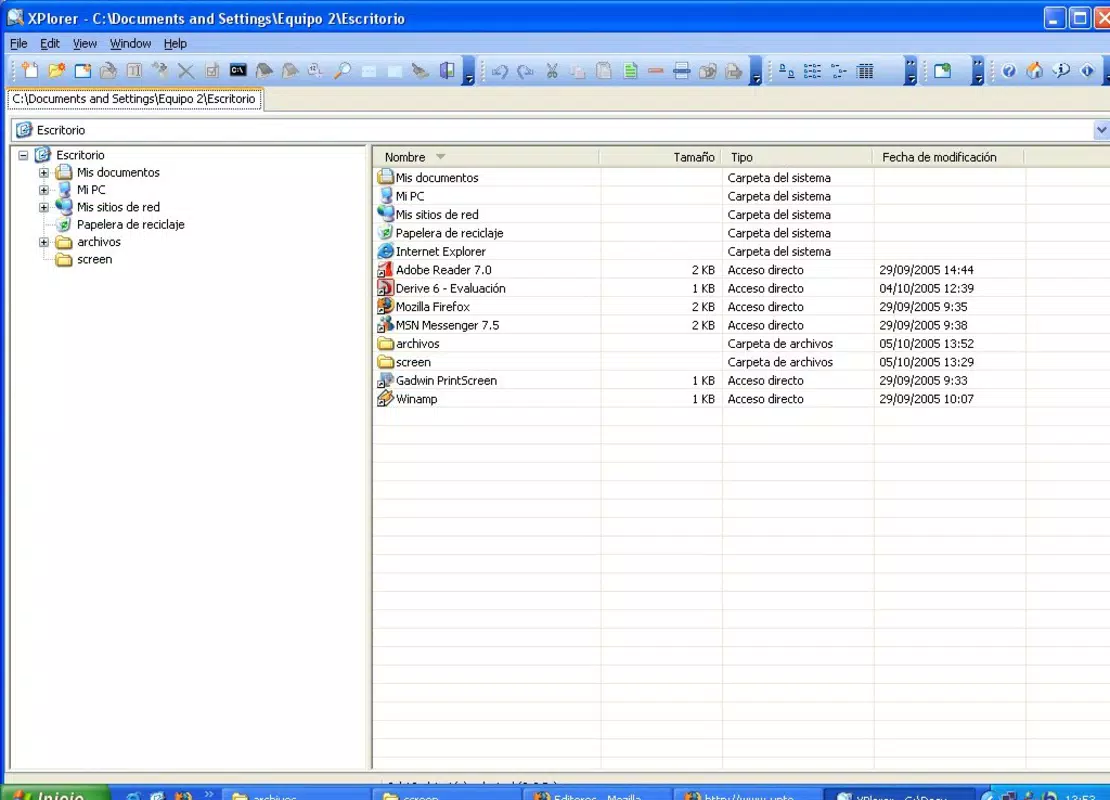
The user interface of XPlorer is designed with functionality and familiarity in mind, offering a layout that mirrors desktop file explorers. The navigation flow is intuitive, with clearly labeled sections for file lists, folder hierarchy, and control panels. Users can easily switch between tabs, apply filters, and access the built-in tools through a consistent menu structure. The visual style is minimalistic, focusing on usability rather than decorative elements, which contributes to a clutter-free experience.
Navigation is streamlined through tab-based access and direct command execution, allowing users to move between tasks without interruptions. The app’s responsiveness appears to be optimized for basic file operations, though the developer did not list formal performance metrics. Although the developer did not specify minimum OS requirements, the app’s lightweight size of 4.3 MB suggests it is designed for efficient operation on a wide range of Android devices, including older models.
Stability and performance are likely consistent given the app’s long-standing presence since 2008. However, compatibility with newer Android versions has not been fully disclosed. Users may experience varying performance depending on their device’s processing power and available memory. The app’s lightweight nature supports smooth operation, but no official benchmarks or user-reported load times were provided.
Platform Compatibility & Technical Requirements
XPlorer is available on the Android platform and is compatible with devices running the specified operating system. The app’s current version is 1.0, with a file size of 4.3 MB, indicating a lightweight footprint that minimizes storage usage. The developer did not specify minimum OS requirements or hardware specifications, so compatibility with specific Android versions or device categories cannot be confirmed.
Given its release date in 2008, the app may have been originally designed for early Android versions. While it may still function on modern devices, users should be aware that updates may not have been released to address newer system APIs or security standards. The app’s free pricing model makes it accessible to a broad audience, though the lack of recent updates raises questions about ongoing support and long-term viability.
Pros and Cons
Pros
- Multi-tab browsing enhances navigation and multitasking efficiency.
- Advanced filtering options improve file search accuracy and speed.
- Integrated file viewer and text editor reduce dependency on external apps.
- Direct system console access supports advanced technical operations.
- Lightweight size (4.3 MB) ensures minimal storage impact.
Cons
- Release date of 2008 suggests potential lack of recent updates or modern features.
- Specific OS requirements and compatibility details were not disclosed.
- No official information on security protocols or data handling practices.
- May not support newer Android system APIs or UI standards.
- Limited availability of user feedback or community support.
FAQ
Is XPlorer safe to download and install?
XPlorer is available for free and does not require payment. However, since the app was released in 2008 and no recent updates have been documented, users should exercise caution. It is recommended to download from trusted sources and ensure device security settings are enabled.
Can I use XPlorer on iOS devices?
Based on the provided information, XPlorer is only available on the Android platform. There is no indication of iOS compatibility or a version for Apple devices.
Does XPlorer support file sharing or cloud integration?
The developer did not provide details on file sharing or cloud storage integration. The app focuses on local file management and system access, but no information on external connectivity was listed.
How do I update XPlorer?
As of the current data, no update mechanism or release history beyond version 1.0 has been disclosed. Users should check the official source for potential updates, though the lack of recent development activity may limit update availability.
What kind of files can I open with XPlorer?
XPlorer includes an integrated file viewer and text editor, supporting various file types. While specific formats were not listed, the app is designed to handle common document and configuration files. Users can preview and edit text-based files directly within the application.
Final Thoughts
XPlorer stands out as a specialized productivity tool for users who require a powerful, multi-functional file manager with desktop-like capabilities on mobile devices. Its multi-tab browsing, advanced filtering, and system console access make it a valuable asset for technical users, developers, and power users managing complex file systems. Despite its age and lack of recent updates, the app’s lightweight design and feature set continue to offer practical benefits for those prioritizing efficiency and control.
While newer file managers may offer modern interfaces and cloud integration, XPlorer remains a niche yet functional solution for users who value simplicity, performance, and direct system access. Its free availability further enhances its appeal for budget-conscious users or those exploring legacy tools.
Download XPlorer now


